Email remains one of the most important communication tools in business. It is also one of the most common ways cyber criminals target organisations.
Phishing emails are designed to trick recipients into clicking malicious links or opening dangerous attachments. They may also urge recipients to share sensitive information. While some phishing attempts are easy to spot, others can appear highly convincing and may even seem to come from trusted suppliers, customers or colleagues.
Understanding how phishing emails work and recognising the warning signs can help protect your business from unnecessary risk.
What Is a Phishing Email?
A phishing email is a fraudulent message designed to persuade the recipient to take a specific action. This action may include:
- Clicking a malicious link
- Downloading an infected attachment
- Entering login credentials into a fake website
- Sharing confidential company information
- Making a payment to a fraudulent account
Cyber criminals often create a sense of urgency to encourage people to act quickly without properly checking the email.
Why Are Phishing Emails So Effective?
Many cyber attacks succeed because they target people rather than technology.
A phishing email may appear to come from:
- Microsoft 365
- Your bank
- A delivery company
- A supplier
- A customer
- A senior member of your organisation
The message may look genuine, include official logos and use professional language, making it difficult to identify at a glance.
Even businesses with strong security measures can become vulnerable if an employee is caught off guard.
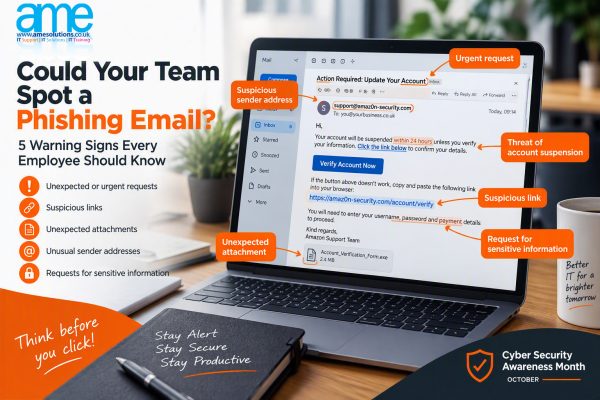
5 Warning Signs of a Phishing Email
1. Unexpected or Urgent Requests
Phishing emails often try to create panic or urgency.
Examples include:
- “Your account will be suspended within 24 hours.”
- “Immediate action required.”
- “Payment must be made today.”
If an email pressures you to act quickly, take a moment to verify the request before doing anything.
2. Suspicious Sender Addresses
Always check the sender’s email address carefully.
At first glance, an address may appear legitimate, but a closer look could reveal subtle differences.
For example:
✅ accounts@company.co.uk
❌ accounts@cornpany.co.uk
Cyber criminals often use addresses that closely resemble genuine organisations.
3. Unexpected Attachments
Be cautious of attachments you were not expecting to receive.
Files can contain malware designed to:
- Steal information
- Encrypt files
- Disrupt business operations
- Provide unauthorised access to systems
If in doubt, verify the attachment with the sender before opening it.
4. Suspicious Links
Before clicking a link, hover over it to check where it leads.
A phishing email may display:
www.microsoft.com
but actually direct you to:
www.micr0soft-security-login.com
If a link looks suspicious, do not click it.
5. Requests for Sensitive Information
Legitimate organisations will rarely ask for passwords, banking details or confidential information via email.
Be particularly cautious if an email requests:
- Login credentials
- Payment information
- Personal information
- Employee records
- Customer data
Always verify the request using a trusted contact method.
What Should You Do If You Receive a Suspicious Email?
If you believe an email may be a phishing attempt:
- Do not click any links.
- Do not open attachments.
- Do not reply to the sender.
- Report the email to your IT provider or internal IT team.
- Delete the email if advised to do so.
If you’ve already clicked a suspicious link or entered information, notify your IT support provider immediately. Acting quickly can help minimise potential damage.
Why Staff Awareness Matters
Many businesses invest in firewalls, antivirus software and other security solutions, but employees remain one of the most important lines of defence.
Regular cyber security awareness training helps employees:
- Recognise suspicious emails
- Understand common cyber threats
- Follow security best practices
- Reduce the likelihood of successful attacks
Creating a culture where employees feel comfortable reporting suspicious emails can significantly improve an organisation’s security posture.
Phishing Awareness Starts with a Simple Question
Before clicking a link, opening an attachment or responding to an unexpected request, take a moment to ask:
“Does this email look right?”
A few seconds of caution can make all the difference.
Cyber criminals continue to evolve their tactics, but informed and vigilant employees remain one of the best defences against phishing attacks.
Need Help Improving Your Cyber Security?
Phishing emails remain one of the most common ways cyber criminals target businesses. While technology plays an important role in protecting your organisation, employee awareness is often your first line of defence.
If you’d like to discuss staff cyber security awareness, Cyber Essentials certification, or ways to strengthen your organisation’s cyber security, our team would be happy to help.
📞 01392 824 022
📧 hello@amesolutions.co.uk